Infrastructure · Network Hardware

The core of a fast, reliable network.

We design and install Ubiquiti UniFi switching — from compact closet switches to enterprise campus PoE — configured for your cameras, phones, access points and workstations.

✓ Ubiquiti UniFi switching✓ Configured & installed in-house
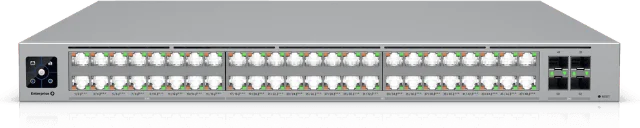
UniFi Enterprise Campus 48 PoE switch
Layer 3

Routing and VLANs on every switch we use

2,150W

PoE budget on the Enterprise Campus 48

25G

Fiber uplinks for campus and core links

1U

Rack-mount designs that keep closets tidy

Why it matters

The right switch makes everything else work

Cameras, Wi-Fi, phones and workstations all depend on the switch. We size each one for today’s devices and tomorrow’s growth.

Power over Ethernet

PoE+, PoE++ and up to 90W PoE+++ to power cameras, access points and phones over one cable.

Room to grow

2.5G and 10G ports with 10G and 25G uplinks for today’s Wi-Fi and tomorrow’s bandwidth.

Segmented & secure

VLANs, inter-VLAN routing and 802.1X keep cameras, guests and staff on separate networks.

Managed in UniFi

Every switch is managed from one UniFi dashboard for fast changes and easy troubleshooting.

The switches we use

Ubiquiti UniFi switching lineup

From a single office closet to a multi-building campus, we match the switch to the job.
Enterprise Campus 48 PoE
Enterprise PoEECS-48-PoE

Enterprise Campus 48 PoE

Enterprise-grade 48-port Layer 3 switch with high-power PoE+++ and hot-swappable power and fans.

Ports16 × 2.5G + 32 × 10G RJ45
Uplinks4 × 25G SFP28
PoE budget2,150W · up to 90W per port
Switching capacity920 Gbps

Best for: Campus and enterprise distribution with heavy PoE loads

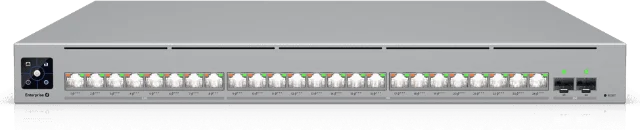
Enterprise Campus 24 PoE
Enterprise PoEECS-24-PoE

Enterprise Campus 24 PoE

Enterprise-grade 24-port Layer 3 PoE+++ switch with redundant, hot-swappable power and fans.

Ports8 × 2.5G + 16 × 10G RJ45
Uplinks2 × 25G SFP28
PoE budget1,050W · up to 90W per port
Switching capacity460 Gbps

Best for: Mission-critical closets that need redundancy

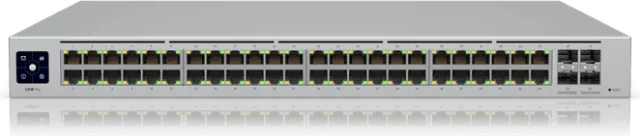
Pro Max 48 PoE
PoEUSW-Pro-Max-48-PoE

Pro Max 48 PoE

48-port Layer 3 Etherlighting™ switch with 2.5 GbE and PoE++ output.

Ports32 × 1G + 16 × 2.5G RJ45
Uplinks4 × 10G SFP+
PoE budget720W · PoE+ / PoE++
Switching capacity224 Gbps

Best for: High-density closets full of cameras and access points

Pro Max 24 PoE
PoEUSW-Pro-Max-24-PoE

Pro Max 24 PoE

24-port Layer 3 Etherlighting™ switch with high-power PoE++ output.

Ports16 × 1G + 8 × 2.5G RJ45
Uplinks2 × 10G SFP+
PoE budget400W · PoE+ / PoE++
Switching capacity112 Gbps

Best for: Smaller sites powering cameras, Wi-Fi and phones

Hi-Capacity Aggregation
AggregationUSW-Pro-Aggregation

Hi-Capacity Aggregation

32-port Layer 3 switch built for high-capacity 10G SFP+ and 25G SFP28 fiber links.

Ports28 × 10G SFP+
Uplinks4 × 25G SFP28
PowerDC backup input (USP RPS)
Switching capacity760 Gbps

Best for: The fiber core that ties your switches together

Pro 48
AccessUSW-Pro-48

Pro 48

48-port Layer 3 switch with 10G SFP+ uplinks and fanless cooling.

Ports48 × 1G RJ45
Uplinks4 × 10G SFP+
CoolingFanless, silent
Switching capacity176 Gbps

Best for: Workstations, printers and wired data drops

Pro 24
AccessUSW-Pro-24

Pro 24

24-port Layer 3 switch with 10G SFP+ uplinks and fanless cooling.

Ports24 × 1G RJ45
Uplinks2 × 10G SFP+
CoolingFanless, silent
Switching capacity88 Gbps

Best for: Offices and classrooms that need quiet, reliable wired ports

Pro Max 16
AccessUSW-Pro-Max-16

Pro Max 16

16-port Layer 3 Etherlighting™ switch with 2.5 GbE and flexible mounting.

Ports12 × 1G + 4 × 2.5G RJ45
Uplinks2 × 10G SFP+
MountingRack, desktop or wall
Switching capacity84 Gbps

Best for: Small offices and remote network closets

Specifications per Ubiquiti. Enterprise Campus PoE budgets depend on power supply configuration and input voltage.

UniFi Pro Max 48 PoE switch
How we deploy

Built, configured and ready to go

A clean install is as important as the hardware itself.

1Plan the networkWe size ports, PoE and uplinks for every device you need to connect.
2Rack & patchNeat mounting, patching and labeling in your network closet.
3Configure in UniFiVLANs, PoE settings and uplinks set up for your cameras, phones and Wi-Fi.
4Test & hand offEvery port and uplink verified before we call it done.

Upgrading your network closet?

Tell us what you need to connect and we’ll recommend the right switches — at a budget-friendly price.